
Description
Game Introduction
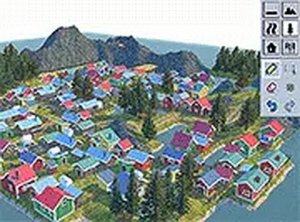
Island Doodle 3D Design Game is a creative and relaxing experience where players can design their own island paradise from scratch. Using intuitive drawing tools, you can shape landscapes, carve rivers, build piers, and add lush greenery to create a unique tropical environment. The game offers a calm, pressure-free space for artistic expression and world-building, suitable for players of all ages who enjoy creativity and design. It runs directly in your browser on PC with no downloads required, making it easy to start building your dream island immediately. The 3D environment allows you to view your creation from any angle, and the simple mouse controls ensure that anyone can begin designing right away. This game is perfect for those who appreciate a peaceful and imaginative outlet, where the only limit is your own creativity.
How to Play
To play Island Doodle 3D Design Game, use your mouse to interact with the 3D world. Players typically click or drag to draw on the island, adding elements like water, land, and vegetation. You can rotate the camera to view your creation from different perspectives, move the camera to explore your island, and zoom in or out for detailed work. The controls are designed for immediate creative play, allowing you to focus on building without complex instructions. Example worlds are available for inspiration, showing how to create features like rivers and piers. The simple interface ensures that anyone can start designing their paradise in minutes.
Game Features
Game features include free-to-play access, full screen mode, a 3D environment, creative drawing tools, and camera controls. The browser-based play means no downloads are required, making it easy to start designing from any PC. The 3D environment lets you view your island from any angle, and the drawing tools allow you to add natural elements like water and vegetation. These features are designed to help you focus on creativity without distractions, providing a relaxing and immersive experience.
Tips for Success
To get the most out of Island Doodle 3D Design Game, experiment with different drawing techniques to create unique landscapes. Use the camera controls to view your island from various perspectives, which can inspire new ideas. Take advantage of the example worlds to learn how to build features like rivers and piers. The game is designed for relaxation, so take your time and enjoy the creative process without pressure.







Player Comments
Sign in to comment
You must be logged in before posting a review or rating.
No account? Create one
No comments yet. Be the first to comment!